When people discover termites, bed bugs, or rodents in their home, they need help fast. Most of them search Google, compare a few websites, and contact the company they trust the most.
That’s why your website matters.
A professional pest control website design helps people find your business, builds trust, and makes it easy to book your services. It can bring you more calls, more quote requests, and more local customers without relying only on paid advertising.
The good news is that creating a professional pest control website is easier than ever. With the right pest control WordPress theme, you can launch a modern, fast, and mobile-friendly website without any coding.
In this guide, you’ll learn:
- Why every pest control business needs a professional website
- The pages and features every website should include
- Pest control website design best practices that generate more leads
- How to improve your local Google rankings
- Common mistakes to avoid
- How much a pest control website costs
- The fastest way to build and launch your website
Whether you’re creating your first website or upgrading an existing one, this guide will help you build a pest control website that attracts more customers and grows your business.
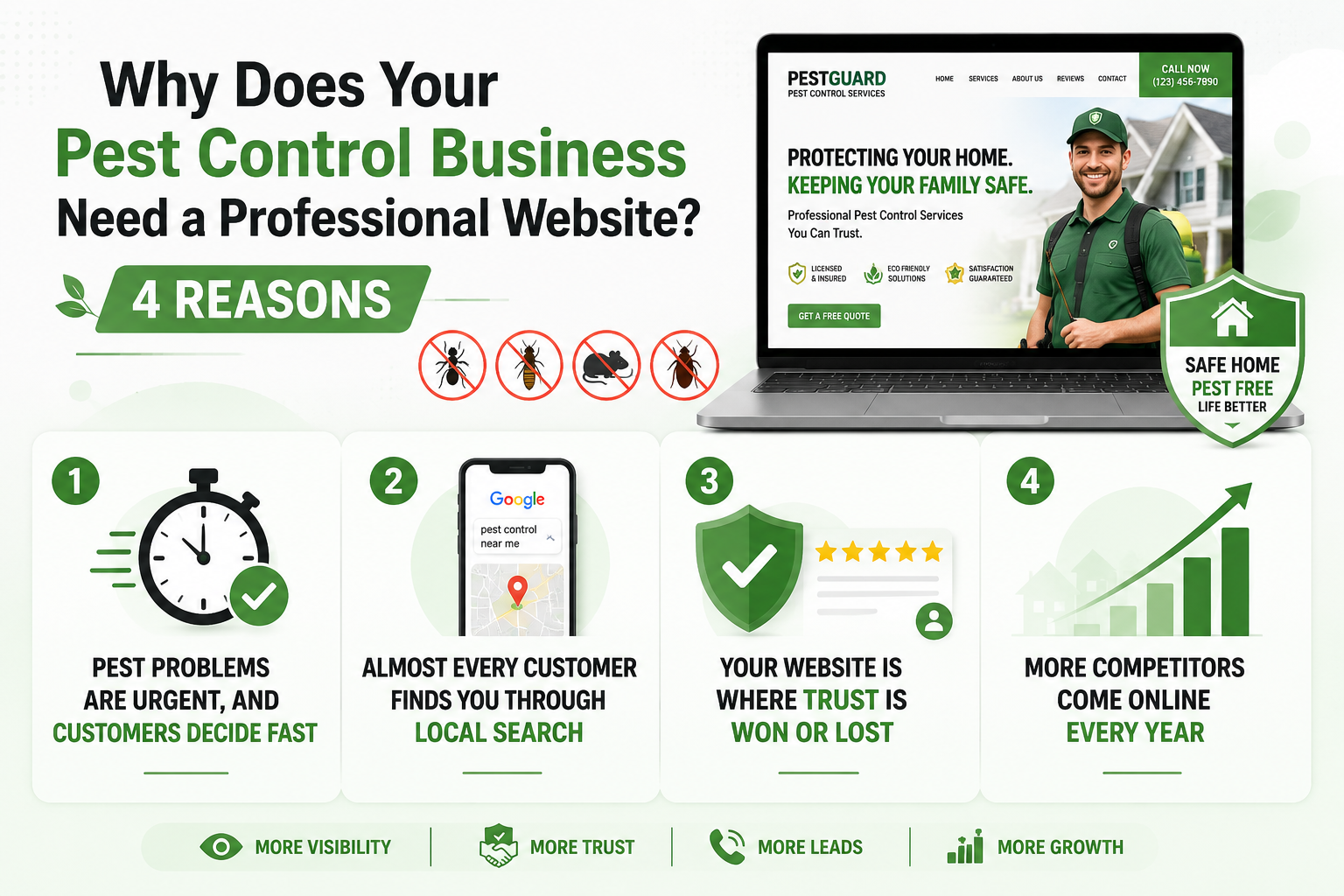
Why Does Your Pest Control Business Need a Professional Website? 4 Reasons
Here are four major reasons why your business needs a professional pest control website:
1. Pest Problems Are Urgent, and Customers Decide Fast
When someone finds termites or hears scratching at night, they don’t shop around for days. They grab their phone, search for help, and choose a company within minutes. Your site has seconds to look trustworthy, or that visitor is gone.
2. Almost Every Customer Finds You Through Local Search
People rarely ask a neighbor for a recommendation first. They type “pest control near me” into Google and call one of the top results. If your site is missing or dated, you hand those calls to a competitor.
3. Your Website Is Where Trust Is Won or Lost
Pest control is personal, since you are asking a homeowner to let a stranger treat their house. That takes real trust, and your website is where you earn it. Clear licensing, real photos, and honest reviews show you are the safe choice.
4. More Competitors Come Online Every Year
The pest control market keeps growing, which is good news and a quiet warning. More demand means more companies fighting for the same local searches. A sharp, fast site helps you stand out, so strong pest control web design is no longer optional.
What Pages Should a Pest Control Website Have?
Great pest control website design starts with the right structure. Each page has a job, from turning a visitor into a lead to ranking for specific pests and towns. Here are the pages every pest control website needs.
- Homepage: Clearly explain your services, service areas, and how customers can contact you. Include strong call-to-action and trust signals.
- Service Pages: Create a separate page for each pest you treat, such as termites, rodents, bed bugs, and ants, to improve user experience and SEO.
- Service Area Pages: Build dedicated pages for every city or location you serve to attract more local customers.
- About Page: Introduce your business, team, experience, and certifications to build trust with potential customers.
- Reviews & Testimonials Page: Showcase genuine customer reviews and ratings to increase credibility and encourage new bookings.
- Contact Page: Make it easy for visitors to call, request a quote, or book a service with clear contact details and a simple form.
- Blog or Pest Guide: Publish helpful pest control tips and guides to attract organic traffic and establish your expertise.
Also Read: Top 10+ Cleaning Services WordPress Themes For Your Business
What Features Turn a Pest Control Website Into a Booking Machine?
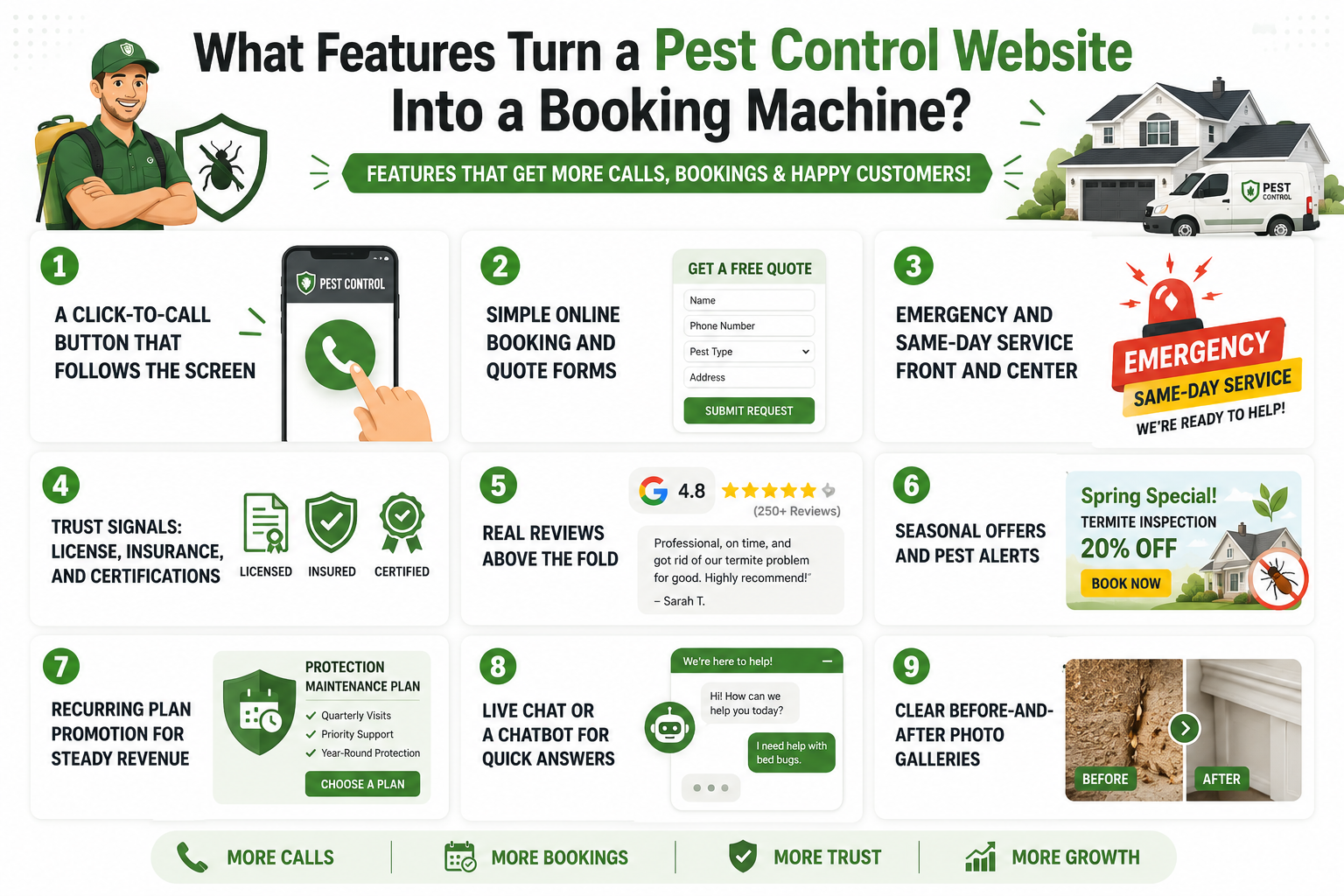
Pages give your site structure, but features turn visitors into booked jobs. The best pest control website design puts the tools people need right where they will use them. These are the features that consistently move the needle.
1. A Click-to-Call Button That Follows the Screen
Most visitors are on a phone, often mid-crisis, making calling effortless. Put your number in a sticky header with a big, tappable call button. One tap should connect them, with no copying or squinting.
2. Simple Online Booking and Quote Forms
Not every job is an emergency, and many people want to book after hours. A short booking or quote form lets them do it any time, on any device. Keep it to the essentials, like name, phone, pest type, and address.
3. Emergency and Same-Day Service Front and Center
A wasp nest at a party won’t wait until Monday, and those customers pay for speed. If you offer emergency or same-day service, make it impossible to miss. Use a bold banner with a clear promise, then back it up.
4. Trust Signals: License, Insurance, and Certifications
Because you enter people’s homes, proof matters more here than in most trades. Show your license number, insurance, and certifications where people can see them. Place them near your phone number and forms, not on a hidden page.
5. Real Reviews Above the Fold
Reviews are the closest thing to a friend’s recommendation, so keep them visible. Show your Google rating and a few genuine reviews near the top of your homepage. Real names and specific results beat a generic “great service” line.
6. Seasonal Offers and Pest Alerts
Pest problems follow the calendar, and your site should too. Rotate banners and offers to match the season, like termite inspections in spring. A timely promotion catches people searching, and keeps your pest control website design current.
7. Recurring Plan Promotion for Steady Revenue
One-time jobs pay the bills, but recurring plans build a business. Give your maintenance plans a clear page with simple pricing and what is included. Show the value against one-off visits, and make signing up a single click.
8. Live Chat or a Chatbot for Quick Answers
Some visitors have a question before they are ready to call, and a live chat catches them. A simple chat widget, or even a basic chatbot, answers common questions and captures details around the clock. It gives hesitant visitors an easy first step, and it turns quiet browsers into real leads.
9. Clear Before-and-After Photo Galleries
Nothing proves your work like showing it, so add a gallery of real results. Before-and-after photos of a treated home or a cleared nest make your service feel concrete and trustworthy. Pair each set with a short caption, and let the images do the convincing for you.
Also Read: 15 Best Roofing Services WordPress Theme
The Fastest Route: Start With a Purpose-Built Pest Control WordPress Theme
You can build every page and feature of a pest control website design from scratch. Or you can start with a theme that already includes them. A purpose-built pest control WordPress theme gives you the pages, layouts, and booking tools out of the box.
Themes from Awaiken Themes are built on Elementor, with drag-and-drop editing, one-click demo import, and no coding. You will find both options in their business WordPress themes. Each of these pest control website templates is built for pest control businesses.
1. Bugfree – Bugs & Pest Control WordPress Theme
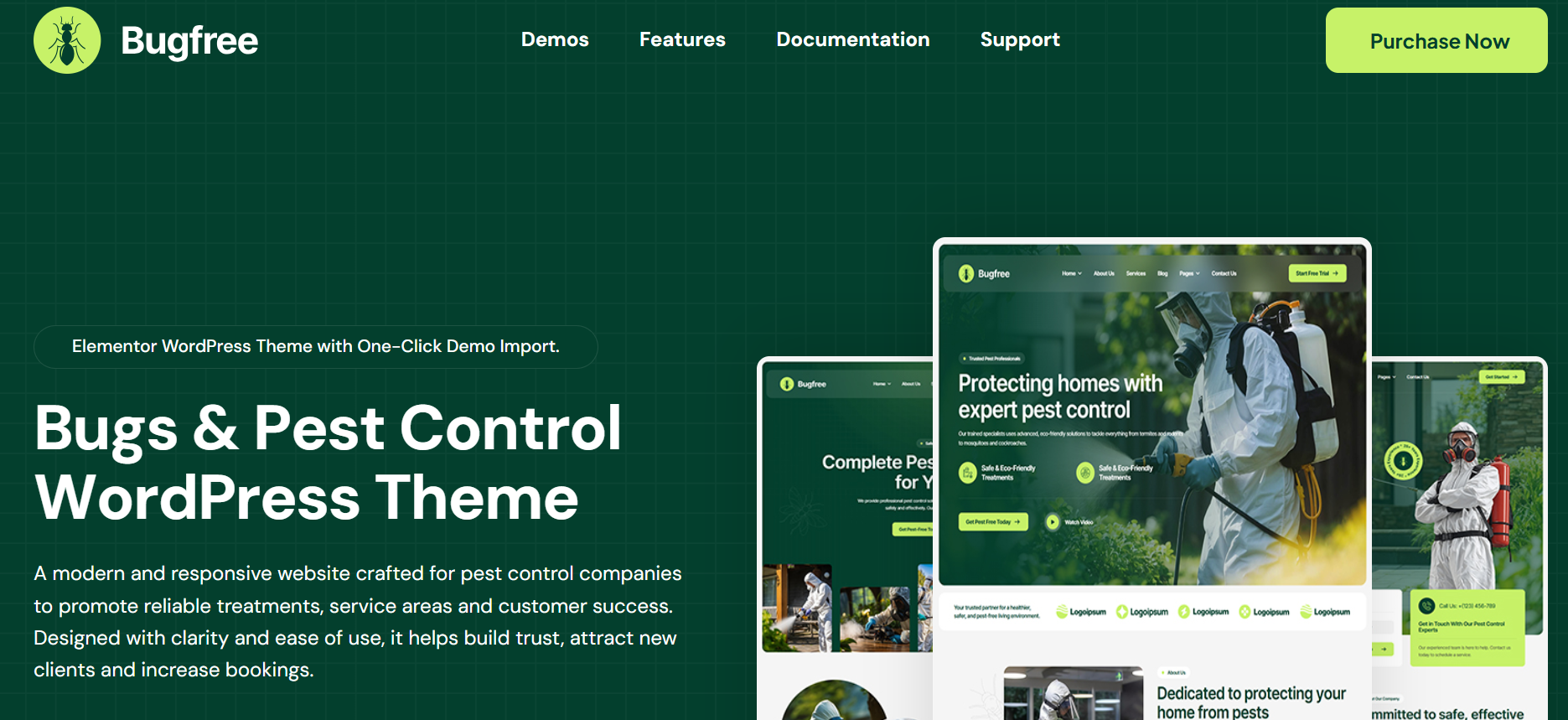
Bugfree is a modern, fully responsive pest control WordPress theme built for exterminators, termite services, and fumigation businesses. It ships with three homepage layouts and every page you need, from services and pricing to team, testimonials, and contact.
Built on Elementor, it uses simple drag-and-drop editing. With one-click demo import, your styled site goes live in minutes. You then swap in your own text and photos. It is SEO optimized, works with Contact Form 7 and WPML, and costs just $39 for a professional pest control website design.
Key Features:
- Modern & Responsive Design: Looks sharp on phones, tablets, and desktops alike.
- One-Click Demo Import: Launch a fully styled pest control website in minutes.
- Drag & Drop Page Builder: Customize every page with Elementor, no coding required.
- Three Homepage Layouts: Pick the layout that best fits your services.
- Complete Pest Control Page Set: Services, pricing, team, testimonials, FAQs, and contact included.
- Customizable Header & Footer: Shape both to match your business identity.
- Lifetime Updates & Support: Stay current with free updates and dependable help.
Pricing: Available for $39 as a one-time purchase (originally $60). Includes premium stock images, lifetime updates, and 6 months of support. Prices are listed in USD and do not include applicable taxes or handling charges.
Best For: Pest control and extermination companies, termite, bed bug, and rodent control services, fumigation and disinfection businesses, wildlife removal, and residential or commercial hygiene providers.
2. Petronus – Bugs & Pest Control WordPress Theme
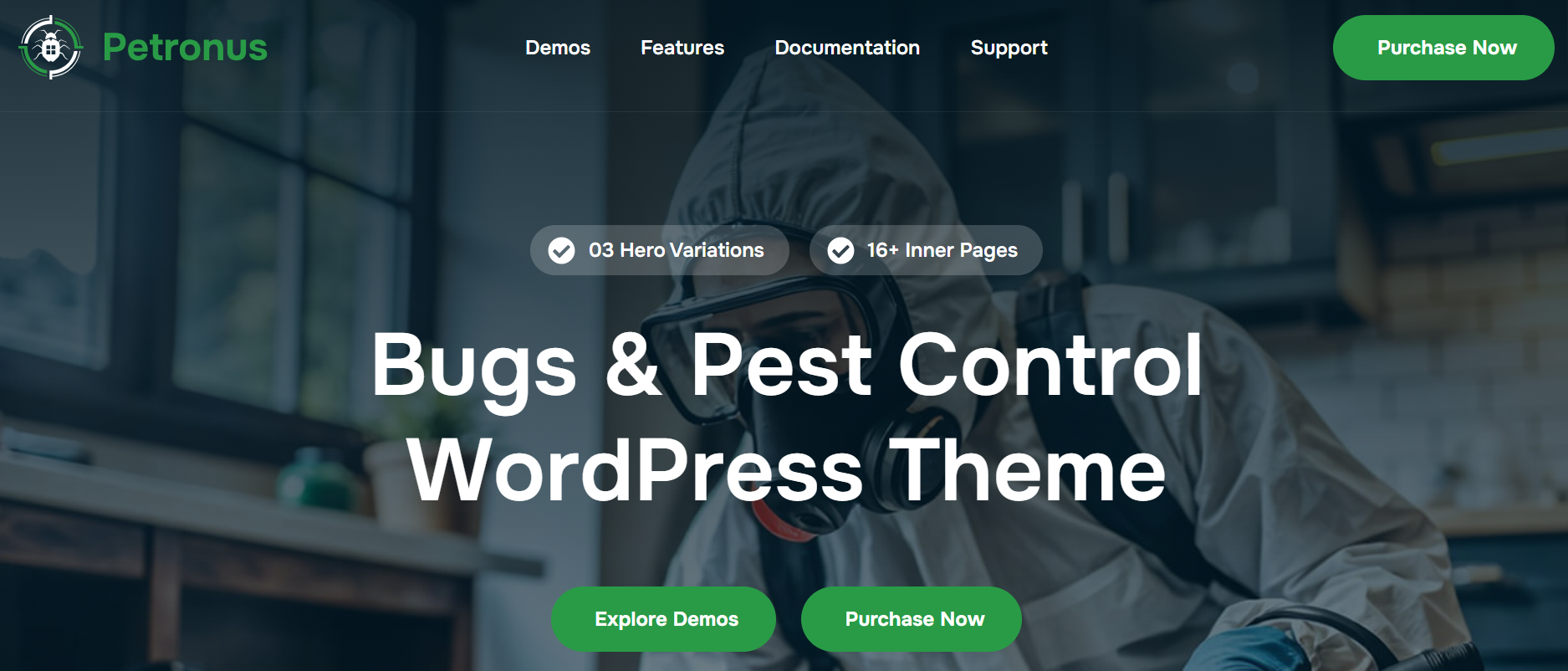
Petronus is a sleek, responsive pest control WordPress theme for services that want a polished, professional look. It comes with three hero layouts plus four header and four footer variations, giving you real flexibility.
Built on Elementor, editing is as simple as dragging elements into place. Every page is ready, from services and projects to pricing, testimonials, and FAQs. Global color and typography controls keep your branding consistent across the whole site. One-click demo import gets you started fast, and at $39, it is a standout pest control website design.
Key Features:
- Modern & Responsive Design: Looks stunning on every device, from desktops to phones.
- One-Click Demo Import: Set up your website quickly with ready-made content.
- Drag & Drop Page Builder: Build and edit pages easily with Elementor.
- Multiple Hero Layouts: Choose from three professionally designed homepage styles.
- Four Header & Footer Variations: Mix and match layouts to fit your brand.
- Global Design Controls: Manage fonts and colors site-wide from one panel.
- Regular Updates & Dedicated Support: Keep your site current with expert help.
Pricing: One-time payment of $39 (regular price: $60). Includes premium images, lifetime updates, and 6 months of support. Prices are in USD and exclude taxes and handling charges.
Best For: Pest control companies, bug extermination businesses, cleaning and sanitation services, and home maintenance and sanitization agencies.
Now that you have seen the two themes that make this simple, let’s walk through building your pest control website design step-by-step.
How to Build Your Pest Control Website Step-by-Step
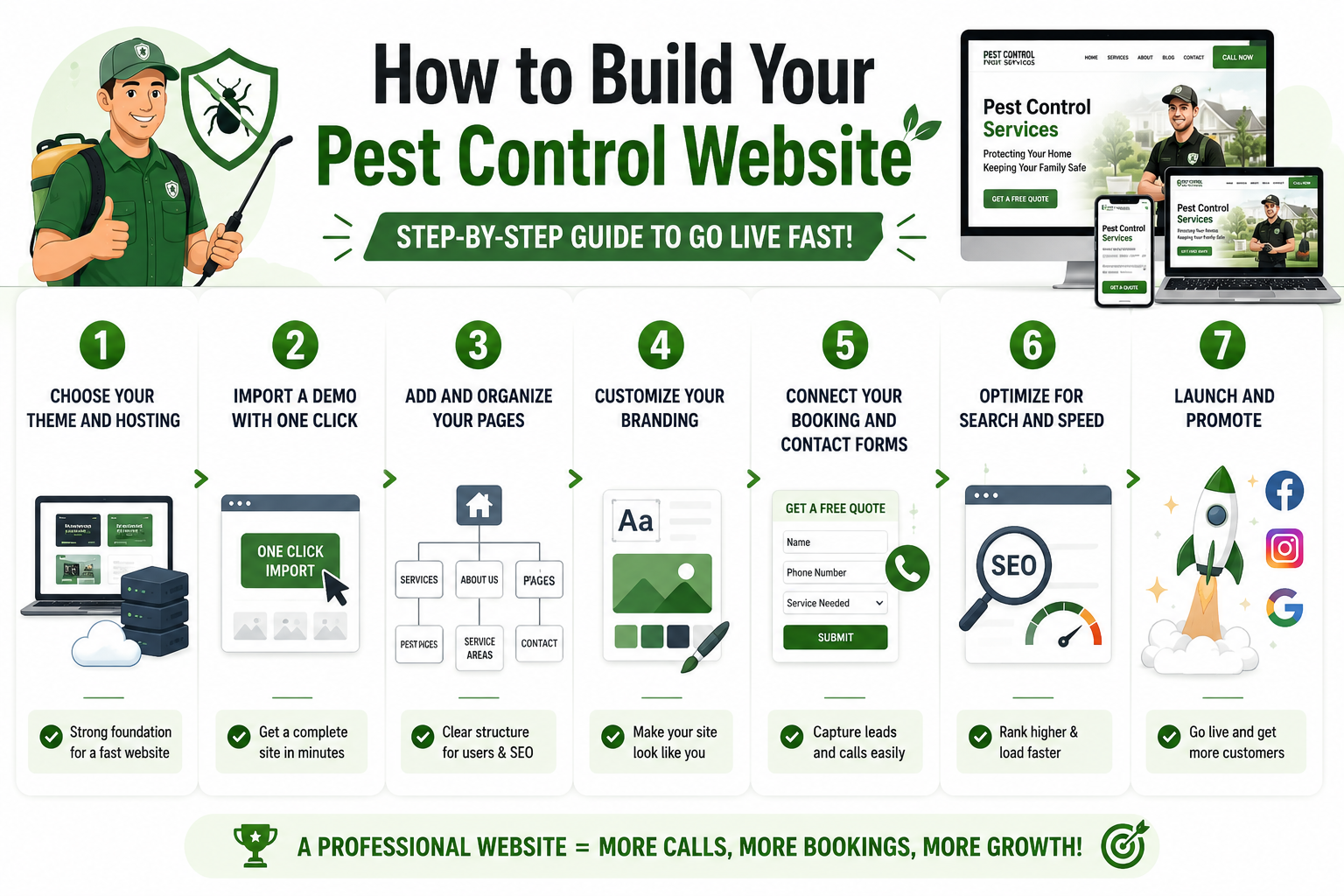
Here is how to turn everything you have learned about pest control website design into a live site. Follow these steps in order, using a theme to skip the hard parts:
Step 1: Choose Your Theme and Hosting
Start by picking a theme built for your industry, like Bugfree or Petronus. Then choose reliable hosting, since your host affects how fast your site loads.
Think of the theme as the design and hosting as the foundation beneath it. Get both right, and every step after this gets easier.
Step 2: Import a Demo With One Click
This is where a good theme saves you days of work. With one-click demo import, you load a complete, pre-built site in minutes.
From there, you are not staring at a blank screen. You simply replace the demo content with your own.
Step 3: Add and Organize Your Pages
Now shape the site around your business. Keep the pages that fit, remove the rest, and add one for each pest and each area you serve.
Set up a clear menu so visitors reach your services and contact page in a click. A logical structure helps customers and rankings alike.
Step 4: Customize Your Branding
This is where the site starts to feel like yours. Add your logo, set your brand colors and fonts, and swap in real photos.
With Elementor’s drag-and-drop editor, you adjust any section by clicking it, with no code. Consistent branding makes you look established.
Step 5: Connect Your Booking and Contact Forms
A polished site still needs to capture leads. Set up your forms with a tool like Contact Form 7, and make sure submissions reach your inbox.
Add your number to the header, turn on click-to-call, and test everything. If a form fails quietly, you never know how many jobs you missed.
Step 6: Optimize for Search and Speed
Before launch, give your site the best shot at ranking. Add local keywords to your titles and headings, and write a short description for each page.
Then check your speed by compressing large images and removing anything you don’t need. A fast, optimized site helps you climb the results.
Step 7: Launch and Promote
With everything in place, it is time to go live. Do a final check on mobile, click through every page and form, then publish.
After launch, share your link on social media, add your site to local directories, and ask happy customers for reviews. A little promotion brings a steady flow of jobs.
How Much Does a Pest Control Website Cost, and How Long Does It Take?
Cost is usually the first question, so let’s answer it plainly. What a pest control website design costs depends on how you build it. Here are the three main routes, with rough figures that can shift by market.
| Route | Typical cost | Timeline | Best for |
|---|---|---|---|
| DIY with a WordPress theme | $0 to $100 for the theme, plus hosting | A few days to two weeks | Owners who want a professional site fast on a small budget |
| Hiring a freelancer | $500 to $3,000 | Two to six weeks | Owners who want light custom work without agency prices |
| Working with an agency | $3,000 to $10,000 and up | One to three months | Established companies wanting a fully custom build |
1. DIY With a WordPress Theme
This is the fastest and most affordable route, and where most small businesses start. You buy a ready-made pest control WordPress theme, import a demo, and customize it yourself. For the price of one service call, you get a site you fully control.
2. Hiring a Freelancer
A freelancer sits in the middle on price and effort. You get some custom design and someone to handle setup, without agency costs. Timelines usually run a few weeks, depending on the back-and-forth.
3. Working With an Agency
An agency gives you a fully custom, done-for-you website, and you pay for it. It is the priciest and slowest route, but it suits larger companies. For most small operators, it is more than the job requires.
Pest Control Website Design Best Practices That Convert
Once your pages and features are in place, design decides whether visitors stay or leave. Good website design for pest control keeps your site fast, clear, and trustworthy on every device.
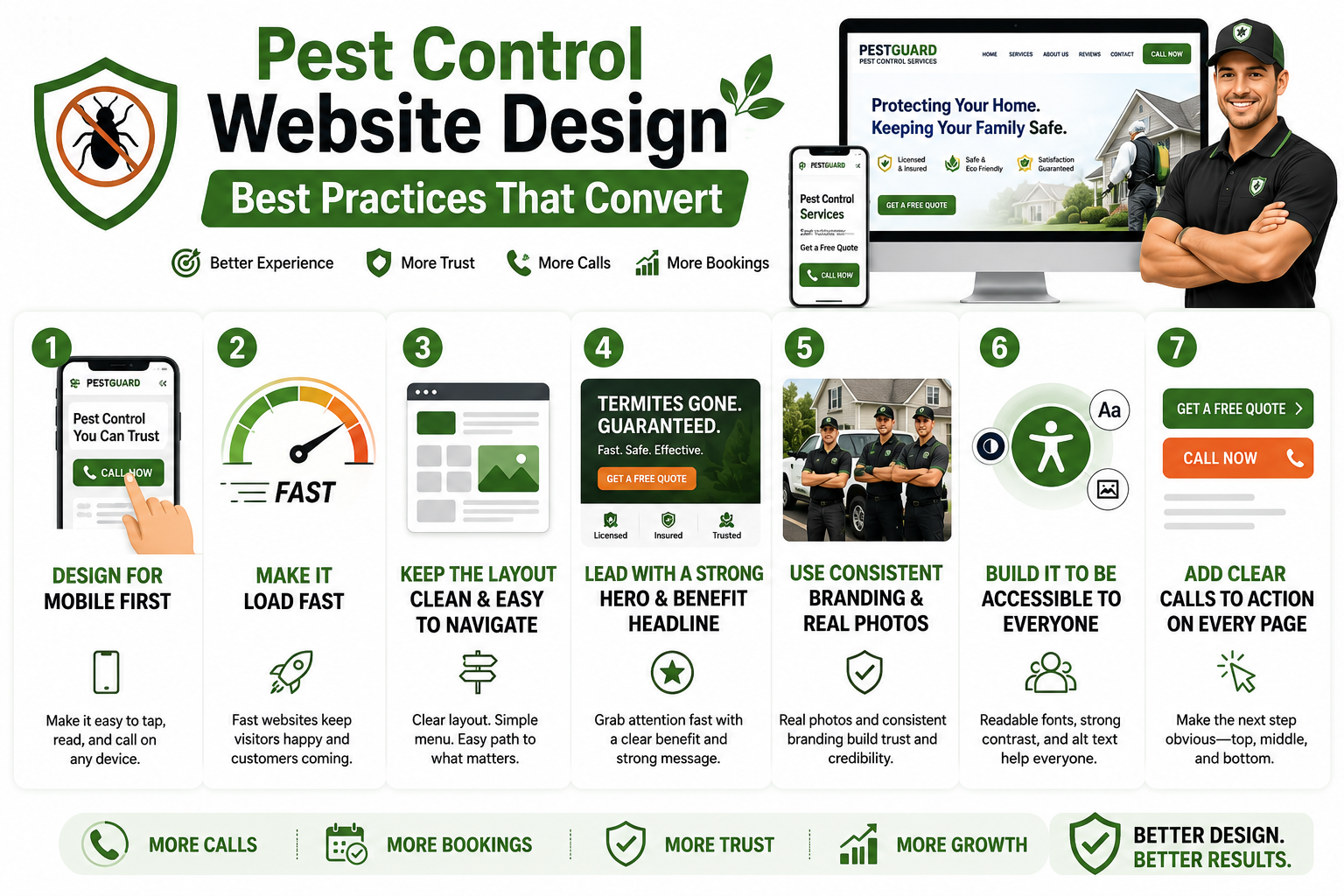
1. Design for Mobile First
More than 60% of web traffic now comes from mobile, and for pest control, it runs higher. Build your site for a phone first, then scale up to desktop. Buttons should be tappable, text readable, and your number one tap away.
2. Make It Load Fast
A slow site loses customers before they see your services. Compress your images, choose reliable hosting, and skip heavy plugins and animations. On mobile, every extra second sends more visitors back to search.
3. Keep the Layout Clean and Easy to Navigate
A cluttered site feels stressful, and stressed visitors leave. Use white space, clear menu labels, and a simple path to key pages. Someone in a hurry should find your services and contact details without thinking.
4. Lead With a Strong Hero and a Benefit Headline
The top of your homepage, the hero section, is your one shot at a first impression. Lead with the customer’s problem, not your history, such as “Termites gone, guaranteed.” Add a short line, a strong button, and a trust signal.
5. Use Consistent Branding and Real Photos
Stock photos of smiling technicians fool no one and quietly hurt trust. Use real photos of your team and trucks, and keep colors and fonts consistent. This is one of the easiest, best pest control website design wins available.
6. Build It to Be Accessible to Everyone
An accessible site is easier for everyone, including older customers and those on small screens. Use readable fonts, strong color contrast, and descriptive text for images. It widens your audience and gives your rankings a small boost.
7. Add Clear Calls to Action on Every Page
A visitor who is ready to act should always see an obvious next step. Put a clear button like “Get a Free Quote” or “Call Now” on every page, not just the homepage. Repeat it near the top and again at the bottom of longer pages. When the next step is obvious, more visitors take it.
What Mistakes Kill Pest Control Website Conversions?
Even a good-looking site can leak customers through simple mistakes. These common pest control website design mistakes are each easy to fix once you spot them.
Mistake 1. A Slow Site on Mobile
Speed is the silent killer of pest control websites. If pages crawl on a phone, most visitors leave before they see a service. Heavy images, cheap hosting, and too many plugins are usually to blame.
Mistake 2. Generic Stock Photos
Those stock photos of a technician with a sprayer sit on a hundred other sites. They make you look interchangeable, not trustworthy. Swap them for real photos of your team, trucks, and jobs.
Mistake 3. Cramming Every Service Onto One Page
A single page listing every pest helps nobody. Visitors can’t find their problem, and Google can’t tell what you specialize in. Give each major service its own page with real detail.
Mistake 4. Hiding Your Phone Number
If someone has to hunt for your number, you have already lost them. Put it in the header of every page, and make it tappable on mobile. For an urgent problem, an easy call is the whole point.
Mistake 5. No Social Proof Where People Can See It
Reviews tucked on a hidden page do nothing for you. Bring your ratings and testimonials up to the homepage, beside your buttons. Seeing that others trusted you makes the decision feel safe.
Mistake 6. Long, Complicated Forms
Every extra field on a form quietly costs you leads. Asking for a mailing address and a life story just scares people off. Keep it short, with name, phone, pest, and location.
Mistake 7. Ignoring Seasonal Demand
Pest problems change with the seasons, and a static site misses every shift. The same content all year means you are invisible when searches spike. Update your banners and offers to match what people face now.
Also Read: Best Plumbing WordPress Theme for Modern Plumbing Businesses
How Do You Get a Pest Control Website to Rank in Local Search?
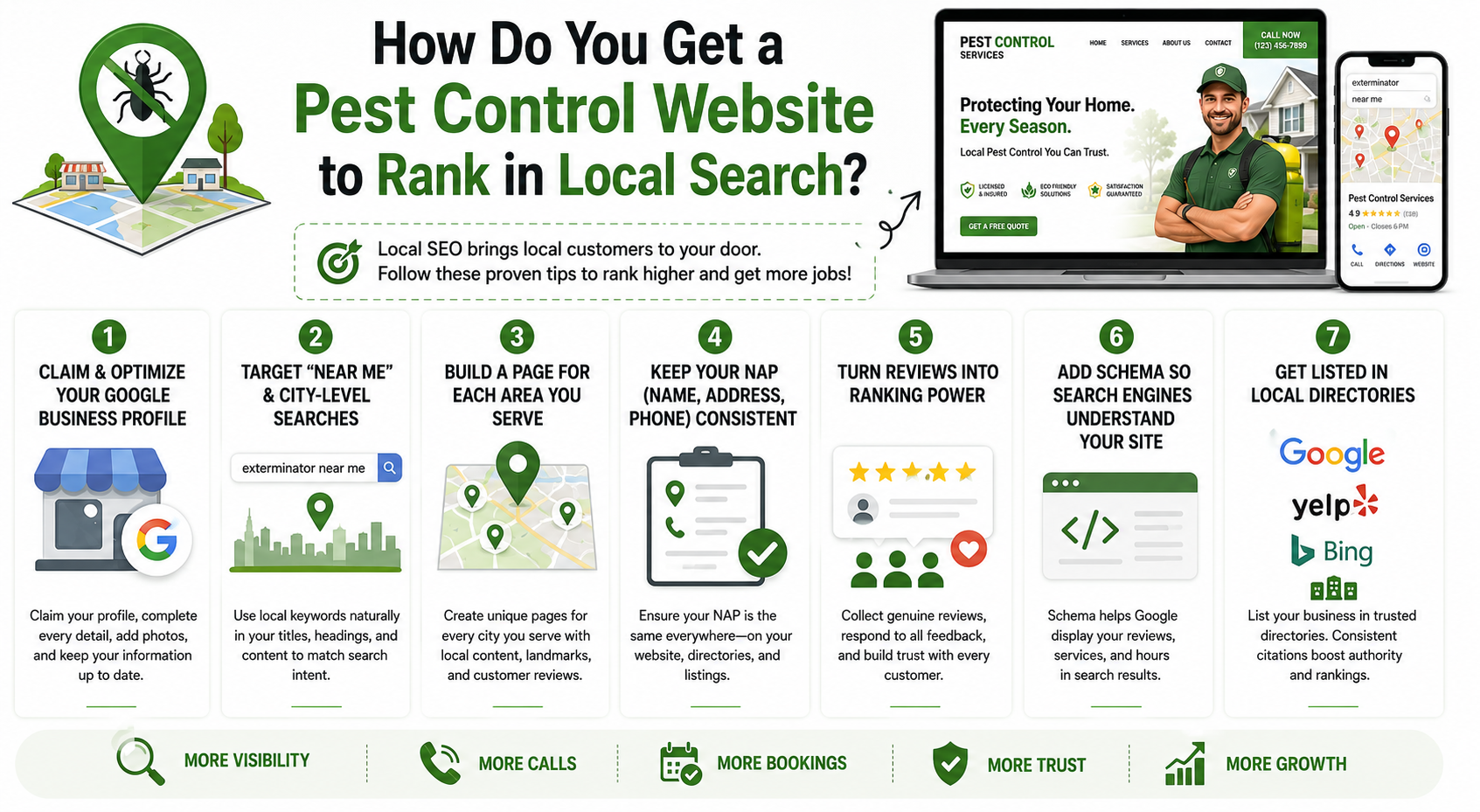
Local SEO is how you get found when someone nearby searches for help. These pest control website design tips focus on the local signals Google cares about most.
1. Claim and Optimize Your Google Business Profile
For local searches, your Google Business Profile can matter as much as your site. Claim it, fill every field, and add real photos of your team and vehicles. Keep your services current and post the occasional seasonal update.
2. Target “Near Me” and City-Level Searches
When people need help, they search with local intent, like “exterminator near me.” Work those phrases naturally into your titles, headings, and content. Don’t stuff them; just make clear where you work and what you treat.
3. Build a Page for Each Area You Serve
Service area pages are some of the hardest-working pages on your site. Create one for every town you cover, each with genuinely local content. Mention local pests, nearby landmarks, and reviews from customers in that area.
4. Keep Your Name, Address, and Phone Consistent
Google trusts businesses whose details line up everywhere online. Your name, address, and phone should match across your site, your listing, and every directory. Even “St.” versus “Street” can slowly chip away at your rankings.
5. Turn Reviews Into Ranking Power
Reviews build trust and help you rank at the same time. Roughly 9 in 10 people read reviews before choosing a local business. Ask for a review after every job, and reply to each one.
6. Add Schema So Search Engines Understand Your Site
Schema is a bit of behind-the-scenes code that tells Google what your business is. It can highlight your reviews, services, and hours right in the results. Most good themes and SEO plugins add it without any code.
7. Get Listed in Local Directories
Beyond Google, your business should appear in trusted local directories and listing sites. Consistent listings on places like Yelp and industry directories build your authority and send more people your way. Make sure your name, address, and phone match your website everywhere they appear. These citations quietly strengthen your local rankings over time.
Why Choose Awaiken Themes for Your Pest Control Website?
Awaiken Themes has helped thousands of businesses build professional WordPress websites that are easy to customize, fast to launch, and designed to generate leads.
Whether you’re starting a new pest control business or refreshing an existing website, our themes make it simple to create a modern online presence without any coding.
Every Awaiken theme includes:
- Industry-specific designs: Professionally designed for pest control businesses with ready-to-use layouts and pages.
- Trusted by thousands: Over 15,000+ sales on ThemeForest from businesses around the world.
- Highly rated: Maintains an impressive 4.7/5 customer rating based on verified buyer reviews.
- 250+ premium Elementor widgets: Build beautiful pages using pricing tables, FAQs, galleries, maps, timelines, testimonials, and more.
- No Elementor Pro required: Everything works with the free version of Elementor.
- One-click demo import: Import a complete website and start customizing in minutes.
- Lifetime updates: Receive free updates to keep your website compatible with the latest WordPress releases.
- Dedicated customer support: Get fast, reliable help whenever you need it.
- Affordable one-time pricing: Themes start from $19 to $49, with no recurring subscription fees.
Ready to build your pest control website?
Choose an Awaiken WordPress theme and launch a fast, professional, and conversion-focused pest control website in just a few clicks.
Conclusion
A great pest control website helps people find your business, trust your services, and book you faster. By using the right pages, essential features, and local SEO, you can turn your website into a reliable source of new customers.
We hope this guide has helped you understand what it takes to build a successful pest control website.
Now it’s your turn. Choose a pest control WordPress theme like Bugfree or Petronus, import a demo, customize it for your business, and launch a website that helps you grow.
Frequently Asked Questions
1. How much does a pest control website cost?
It depends on how you build it. A ready-made pest control theme like Bugfree or Petronus costs around $39 plus hosting. A freelancer runs $500 to $3,000, and an agency more. A theme offers the best value and fastest launch.
2. What pages should a pest control website include?
At a minimum, include a homepage, a page per pest you treat, and service area pages. You also want an about page, a reviews page, and a contact page. A simple blog helps bring in early researchers.
3. Do I need coding skills to build a pest control website?
No coding skills are needed at all. Themes like Bugfree and Petronus run on Elementor, so you design with drag-and-drop editing. With one-click demo import, you edit a finished site rather than build one.
4. How do I get my pest control website to rank on Google?
Focus on local SEO for your pest control website design. Claim your Google Business Profile, build a page for each area, and keep details consistent. Collect genuine reviews, and choose a fast, SEO-friendly theme.
5. Should I show pricing on my pest control website?
You don’t have to list exact prices, since jobs vary by pest and property. Sharing a starting range or a “free quote” option still helps set expectations. Transparency tends to build trust with new customers.
6. How important is mobile for a pest control website?
Mobile is essential, not optional. Most people search for pest control on their phones, often mid-problem, so your site must work perfectly there. A responsive theme handles this across every screen size.
7. How fast can I launch a website with a pest control theme?
You can be up and running within a day. With one-click demo import, a styled site goes live fast, and you add your content afterwards. It is the quickest route from nothing to a professional site.
8. Do I need to update my pest control website, and how often?
Yes, a little upkeep keeps your site secure and effective. Refresh your seasonal offers and reviews, and keep your theme updated. Bugfree and Petronus include lifetime updates, and you don’t need Elementor Pro.